


If screen time has become the main source of tension in your house, you’re definitely not alone. It’s a major problem for a lot of parents I speak to. But it doesn’t usually start as a “big” problem.
Instead, the main issues lie in the small, everyday habits that slowly creep in. A tablet here, a quick game after school there. A phone to keep the peace while dinner’s cooking… until one day it feels like screens are the default activity and every attempt to rein it in turns into a battle.
The goal of this guide isn’t to ban screens or turn you into the household villain. That approach rarely works for long anyway. What usually sticks is something far less dramatic: predictable boundaries, realistic limits, and a setup that quietly supports good habits instead of fighting them.
So how do you actually do that in real life? Let’s break it down.
But first…
Why Screen Time Feels Out of Control (Even With Limits)

This is the part most parents miss, because it’s not about willpower or discipline. But the honest truth is that screens are designed to be addictive and fill time gaps.
Modern apps and games are built around:
- Autoplay
- Infinite scrolling
- Notifications that demand attention
- Social pressure to stay connected
There’s always something else to tap, watch, or respond to. So when a screen is available, it naturally fills time, especially for kids.
Limits Alone Don’t Change Behaviour
Screen time limits are useful, but they don’t magically teach your child balance.
What usually happens instead is:
- Kids wait out the clock.
- Time shifts to another device.
- Arguments start when the rules kick in.
Real change can only happen when limits and rules support routines, rather than trying to replace them.
Here’s a closer look at how you can use routines, boundaries, and a few smart tweaks to make screen time less of a battle in your household.
Start With the Big Picture (Before Changing Any Settings)
Before you start setting timers or blocking apps, it’s worth stepping back for a moment.
When screen time feels out of control, it’s usually because screens have started replacing something else, not because kids suddenly became obsessed overnight.
What Is Screen Time Replacing?
This question changes how you approach the problem.

In most homes, increased screen time comes at the expense of:
- Sleep
- Homework or reading
- Outdoor play
- Family time
- Or boredom (which is more important than it sounds)
Boredom is where creativity, problem-solving, and self-regulation develop. When every spare moment is filled with a screen, kids never get the chance to practice those skills.
A Quick Gut Check for Parents
To understand what’s really going on, it helps to look for patterns rather than focusing on a single number.
Ask yourself:
- Does screen time spike on certain days?
- Is it worse when your child is tired or overstimulated?
- Does it creep in most during unstructured time?
Those patterns are far more useful than a raw number of minutes.
Once you understand the role screens are playing, it becomes much easier to reduce their hold, without turning them into forbidden fruit.
3 Simple Strategies That Actually Reduce Screen Time
The most effective screen time rules aren’t strict or complicated. They’re boring. And boring rules are much easier to live with.
Strategy #1: Make Screen Time Predictable
Uncertainty is what fuels negotiation.
When kids don’t know:
- How long they get.
- When it will end.
- Or when they’ll get it again.
…they push harder to hold onto it.
Instead, aim for:
- The same screen times most days.
- Clear start and stop points.
- No daily renegotiation.
When screen time is predictable, it becomes part of the routine rather than a constant bargaining chip.
Strategy #2: Use Time-Based Rules, Not Mood-Based Ones
Rules based on mood (like “not today” or “you’ve had enough”) feel arbitrary to kids, even when they’re reasonable.
Time-based rules work better.
Here are just a few examples you can try:
- Screens can only be used after homework.
- No screens before school.
- All screens off at a set time in the evening.
Because the rule is based on the clock (not behavior), the emotional weight is completely removed from the conversation.
Strategy #3: Devices Live in Shared Spaces
This rule helps reduce overuse without constant enforcement.
By keeping devices out of bedrooms, using them mainly in shared areas, and charging them overnight in one central place, screen time naturally drops.
The result? Sleep improves, and checking in feels normal rather than intrusive. Plus, your child is less likely to drift into long, unplanned sessions.
How to Reduce Screen Time: Using Technology to Support (Not Fight) You
Once the rules are clear, technology can do the boring enforcement for you (quietly and consistently, without turning you into the bad guy).
Here are a few practical strategies for letting technology enforce the rules you’ve already set.
Screen Time Tools Are Backup, Not the Boss
Think of parental controls on devices as guardrails, helping to enforce agreed boundaries and remove temptations.
They shouldn’t be:
- The main negotiator.
- A daily punishment tool.
- Constantly adjusted on the fly.
If you find yourself tweaking limits every day, something else in the routine needs attention.
Set Realistic Limits on Phones & Tablets
This is where many setups fall apart. It’s tempting to assume stricter limits will solve the problem, but overly tight rules usually create more problems than they solve.
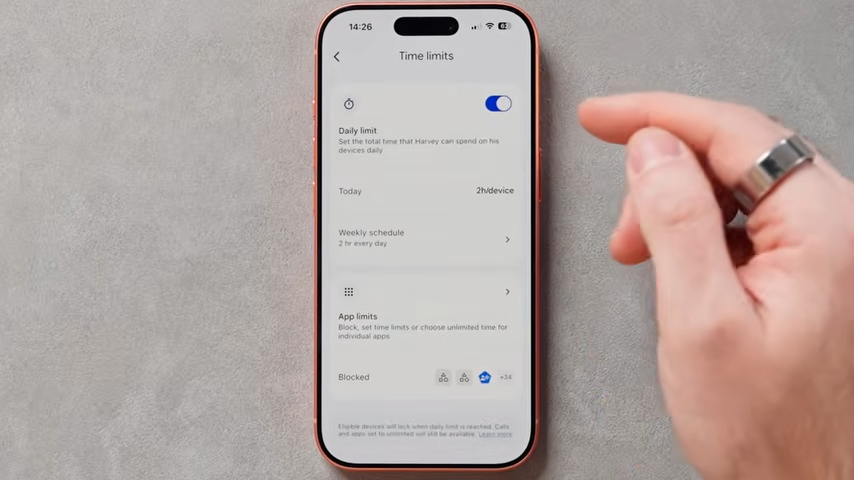
Realistic limits, on the other hand, tend to fade into the background. They rarely need intervention, and they also support healthier habits instead of fighting them.
Here are a few examples of more realistic screen time limits:
- Different limits for school days and weekends, rather than one rule that never quite fits.
- Unlimited access to “utility” apps (phone, messages, maps) with stricter limits on games and entertainment.
- Automatic downtime that starts before bed.
- Shorter limits on fast-dopamine apps (games, short-form video), longer limits on slower content.
If you need some help setting realistic limits for your household, you may find these specific guides helpful:
For Android and Samsung users: How to Check Screen Time on Samsung and Set (Realistic) Limits
For Apple users: How to Check Screen Time on iPhone & Apple Devices
Bedtime & Downtime Are Non-Negotiable
If there’s one area where screen time causes the most damage, it’s sleep.
Here are some solid rules to try:
- Screens off before bed.
- Devices charge outside bedrooms.
- Downtime set to lock devices automatically.
This removes late-night temptation entirely, and you don’t have to keep checking.
Reduce Screen Time by Adding (Reasonable) Friction
You don’t need to ban screens entirely to limit their use. Small bits of friction can actually make a big difference.
Examples could be:
- Wi-Fi pauses at certain times of the day.
- App approvals for new downloads.
- Removing auto-login on shared devices.
None of these rules should feel like punishment, they just slow things down and make screen time for the whole family more intentional.
Final Thoughts: Why Screen Time Sits at the Centre of Online Safety
So why is screen time such a big deal?
Because the longer kids are online, the more content, messages, and rabbit holes appear. By limiting those opportunities by default, you can reduce the risk without relying on perfect filters or constant monitoring.
More importantly, screen time rules in childhood help shape their habits later on in life. Predictable limits and clear downtime help prepare younger children for things like social media, their first phone, and greater independence online.
Figuring out how to reduce screen time is only one piece of the puzzle, though. If you want help with devices, apps, internet access, and the settings that tend to cause issues later on, my Definitive Guide to Protecting Your Kids Online pulls it all together in one place.
And if you’d rather see everything set up step by step, including the menus and safety settings in real time, you can also watch the full video walkthrough below.
