


After reviewing LG's 27-inch and 39-inch UltraGear monitors earlier this year, I was curious to see whether bigger really is better. So when LG asked if I'd like to test its new flagship display, the answer was pretty easy.
The LG 52-inch monitor is the biggest UltraGear display LG has ever built, but size alone isn't enough to justify a monitor like this. After spending time gaming, working, and putting it through my usual day-to-day workflow, I wanted to find out whether it offered something genuinely different or was simply a larger version of the 45-inch model.
As it turns out, LG has built this monitor for a very specific type of gamer. If that's you, it's one of the most enjoyable displays I've tested. Here's what I liked, where I think it falls short, and whether I'd actually recommend buying it.
What Makes the LG 52-inch Monitor Different?
It's easy to look at this monitor and assume it's simply a larger version of LG's 45-inch UltraGear OLED. After using both, I don't think that's what LG was trying to build at all.
Instead, this feels like a monitor designed around one idea: creating the biggest, most immersive gaming experience possible without stepping into TV territory.
It Feels Every Bit as Big as It Looks
The first thing that struck me wasn't the refresh rate or the resolution. It was the sheer size.
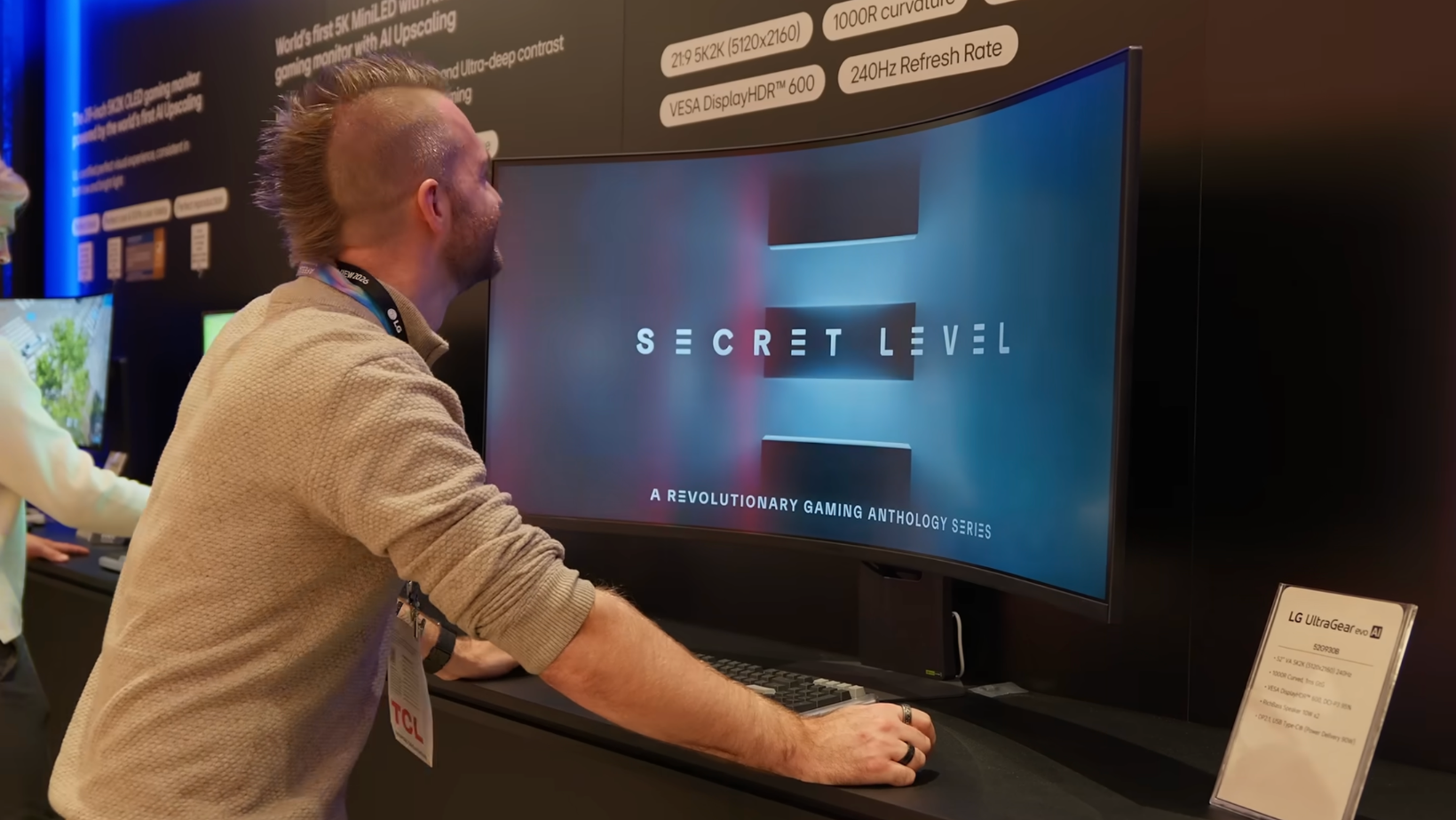
At 52 inches, this display completely changes how your desk feels. It dominates your setup in a way that smaller ultrawide monitors simply can't, but thanks to the 1000R curve, it never felt awkward to use from a normal desk distance.
A big part of that comes down to the 1000R curve. Sitting at a normal desk distance, the display wraps around your field of view naturally, making games feel far more immersive while still remaining comfortable for everyday work.
The Specs Tell Part of the Story
If you've been searching for an LG 52-inch 4K monitor, there's one important thing to know. This isn't actually a standard 4K display.
Instead, LG has gone with a 5K2K ultrawide resolution of 5120 × 2160. You still get the sharpness you'd expect from a premium display, but with considerably more horizontal workspace than a traditional 4K monitor.
Alongside that, you're getting:
- 240Hz refresh rate
- 1ms response time
- DisplayHDR 600
- AMD FreeSync Premium
- USB-C with 90W charging
On paper, it's an impressive specification sheet. In practice, though, it's the way those features come together that makes the biggest difference.
Gaming Is Where This Monitor Really Shines

The longer I used this monitor, the more obvious it became who LG built it for.
The Size Changes the Experience
I've tested plenty of ultrawide monitors over the years, but this is one of the few where the size genuinely changes how games feel.
In racing games especially, the combination of the wide aspect ratio and curved panel almost wraps the track around you. It adds a real sense of speed and immersion that's difficult to explain until you've experienced it yourself.
Open-world games benefit too. There's simply more happening in your peripheral vision, making everything feel that little bit more natural.
You'll Need a Powerful PC
There's one catch.
A display with this resolution and refresh rate asks a lot of your graphics card.
During testing, I paired it with high-end AMD and Intel systems, and they handled modern games brilliantly. Even so, driving 5K2K at 240Hz is no small task. If you're buying the LG 52-inch monitor, make sure the rest of your setup is capable of taking advantage of what it offers.
Console Gaming Isn't Forgotten
Although this is clearly aimed at PC gamers, I also spent time using it with consoles.
The good news is that PlayStation 5 and Xbox Series X both work exactly as you'd hope, with support for 120Hz, HDR, and variable refresh rate where available.
You obviously won't use the full 240Hz refresh rate on a console, but if your desk doubles as both a PC and console setup, this display handles both comfortably without feeling like you've compromised either experience.
It's Surprisingly Good for Everyday Work
Gaming is clearly the priority, but I don't think that's the whole story.
I spent just as much time writing, editing, answering emails, and juggling multiple applications as I did gaming, and that's where this monitor surprised me.
The Extra Width Makes a Difference
The biggest advantage of the LG 52 ultrawide monitor isn't actually the height. It's the width.
Having that much horizontal space makes multitasking incredibly easy. I regularly had multiple browser windows, documents, and messaging apps open at the same time without feeling cramped.
If your work involves spreadsheets, coding, research, or simply bouncing between lots of applications, it's an enjoyable monitor to use.
It's Not My First Choice for Productivity
That said, I still wouldn't buy this monitor purely for work.
The VA panel simply can't match the color accuracy, contrast, or text clarity of LG's 45-inch UltraGear OLED, particularly if your day revolves around creative work.
If gaming comes first and productivity comes second, I think you'll be perfectly happy. If it's the other way around, I'd still point you towards something designed specifically with productivity in
Where the LG 52-inch Monitor Starts to Compromise
As much as I've enjoyed using this monitor, I don't think it's perfect. In fact, there are a few trade-offs you should understand before spending this kind of money.
None of them are deal-breakers, but they might be depending on how you use your computer.
This Isn't an OLED
The biggest compromise is also the most obvious one.
Unlike LG's smaller flagship UltraGear displays, this uses a VA panel instead of OLED. That means you don't get the same deep blacks, vibrant colors, or contrast that make OLED monitors look so impressive.
The upside, of course, is that you don't need to worry about OLED burn-in if you spend hours with static windows open every day. For plenty of people, that's a worthwhile trade-off.
Personally, though, I still think the LG 45-inch UltraGear OLED delivers the better all-round picture quality.
It's Built for Gaming First
This is another area where expectations matter.
If you're expecting a monitor that excels equally at gaming, color-critical work, and media creation, I don't think that's what LG was aiming for.
Everything about this display points toward gaming. The refresh rate, curved panel, and overall experience all support that. Productivity feels more like a bonus than the primary goal.
That's not a criticism. It's simply understanding what this monitor was designed to do.
How It Compares to Other Ultrawide Monitors
One thing I kept asking myself throughout testing was whether I'd actually choose this over some of the other large displays I've used.
The answer depends entirely on what you're looking for.
LG 45-inch UltraGear OLED
This is probably the comparison most people will make.
If gaming is your only priority and you want the best possible image quality, I'd still lean towards the LG 45-inch UltraGear OLED. The OLED panel produces richer colors, much deeper blacks, and noticeably sharper text thanks to its higher pixel density.
The LG 52-inch monitor, however, wins on sheer scale. If you've always wanted a display that completely fills your field of view, especially for racing games or flight simulators, the extra size genuinely changes the experience.
Dell 52-inch Thunderbolt Monitor
These two monitors are built with very different priorities in mind.
The Dell 52-inch Thunderbolt Monitor is one of my favorite productivity displays thanks to its excellent connectivity, Thunderbolt hub, built-in KVM, and sharper IPS Black panel.
The LG takes almost the opposite approach. It sacrifices some of those productivity features in favor of gaming performance, delivering a much faster refresh rate and a far more immersive experience.
If I spent most of my day working, I'd buy the Dell.
If I spent most of my evenings gaming, I'd buy the LG.
Samsung Odyssey G9
The Samsung Odyssey G9 is still one of the best ultrawide gaming monitors available, and it's probably the closest alternative to consider.
Where the Samsung wins is pixel density and Mini LED performance on certain models. Where I think the LG stands out is simply its physical presence. It feels larger, more immersive, and particularly well suited to sim racing thanks to the combination of its size and 1000R curve.
Neither is a bad choice. It really comes down to whether you prefer Samsung's super-ultrawide format or LG's taller 5K2K display.
My Verdict After Testing the LG 52-inch Monitor
The LG 52-inch monitor isn't trying to be the perfect monitor for every desk, and I actually think that's one of its biggest strengths. If you want a huge 52-inch display with a 240Hz refresh rate and no concerns about OLED burn-in, it's incredibly easy to recommend.
I'd still choose the LG 45-inch UltraGear OLED as my all-round recommendation, but if immersive gaming or sim racing is your priority, this monitor absolutely deserves a place on your shortlist.
If you enjoy practical reviews like this, subscribe to my Experiments in Progress newsletter. I share the latest gear I'm testing, buying advice, and behind-the-scenes thoughts that don't always make it into my YouTube videos.
